Home
User Guides
Developer Onboarding
Developer App Management
Account Information Service (AIS) flow
MTLS - Certificate Addition
Letter Of Guarantee flow
PIS - Payments flow
PIS - Refunds flow
PIS - Request To Pay flow
Core Bank - Reference Bank to simulate Core Banking
Consent Module
Admin Module for Bank administrator users
FAPI Conformance Test Suite
Testing Guides
Standards
Certifications
FAQs
Account Information Service (AIS) flow
When the Developer wants to test the AIS APIs, they would need to create an app in their dashboard, of API product type KSA AIS.
- Customer consents AISP that he/she would like to share his/her bank information & chooses the bank.
- Developer (AISP) contacts the bank & sends Account Consent Request.
- Bank checks if Developer App Id (client_id) has necessary authorizations
- Bank uses the information & creates consent resource & initializes to AwaitingAuthorisationstatus
- Bank responds to the Developer with the Consent Response, which also instructs the Developer on how to proceed with the Authentication & Authorisation.
- The Developer redirects the bank customer to the bank website for authentication (in Redirect method) & consent confirmation.
- After the necessary checks, bank sends Access Token to the Developer, which is used to retrieve the account information of the PSU.
Illustrative Flow for AISP
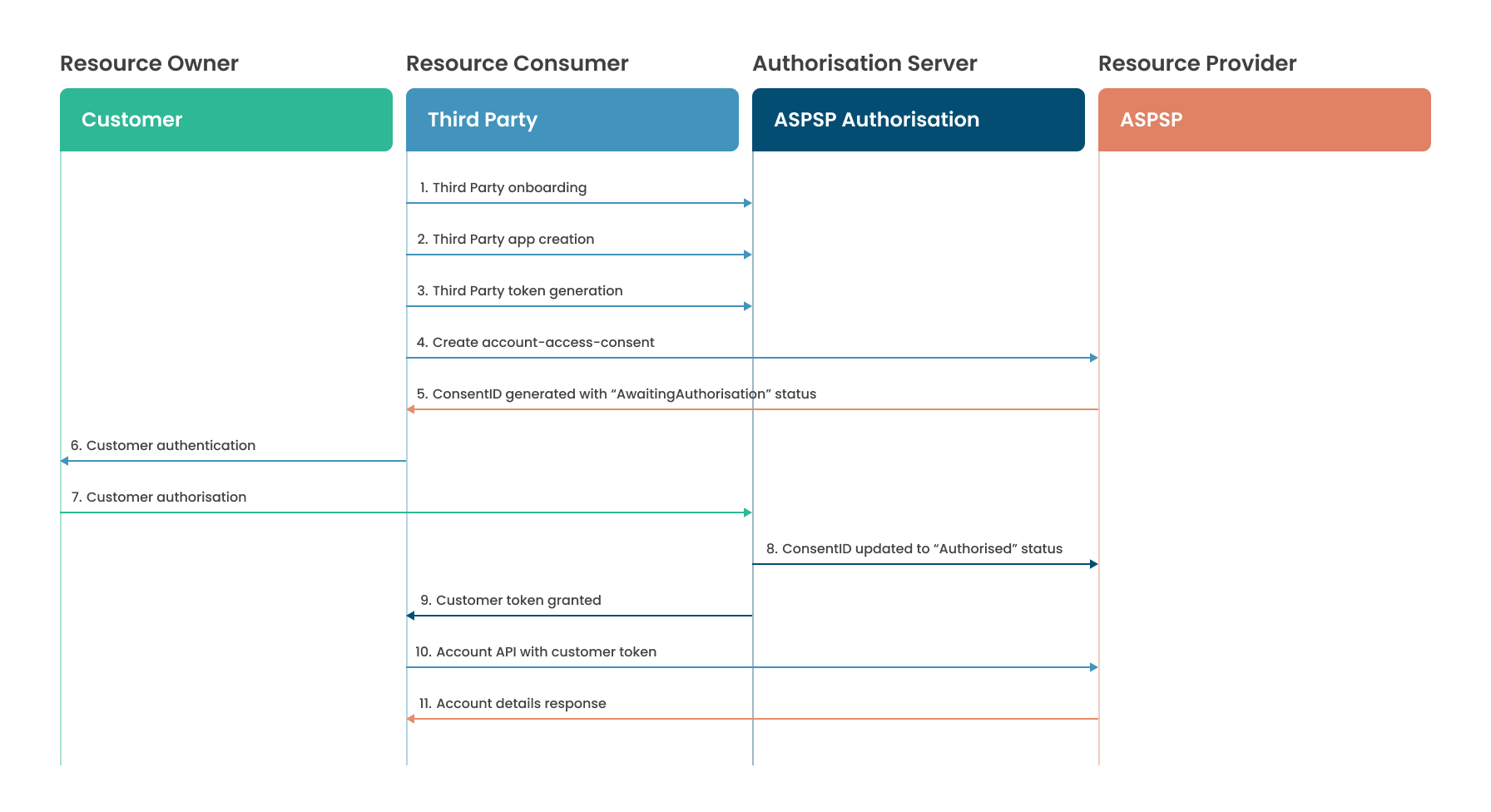
- Step 1: Third party onboarding
- Step 2: Third party App Creation
- Step 3: Third Party token generation
- Step 4: Create account-access-consent
- Step 5: ConsentID generated with "AwaitingAuthorization" status
- Step 6: Customer authentication
- Step 7: Customer authorization
- Step 8: Consent updated to "Authorized" status
- Step 9: Customer token granted
- Step 10: Account API with customer token
- Step 11: Account details response
AISP Dev Portal Testing
The following steps are required to complete the AISP flow:
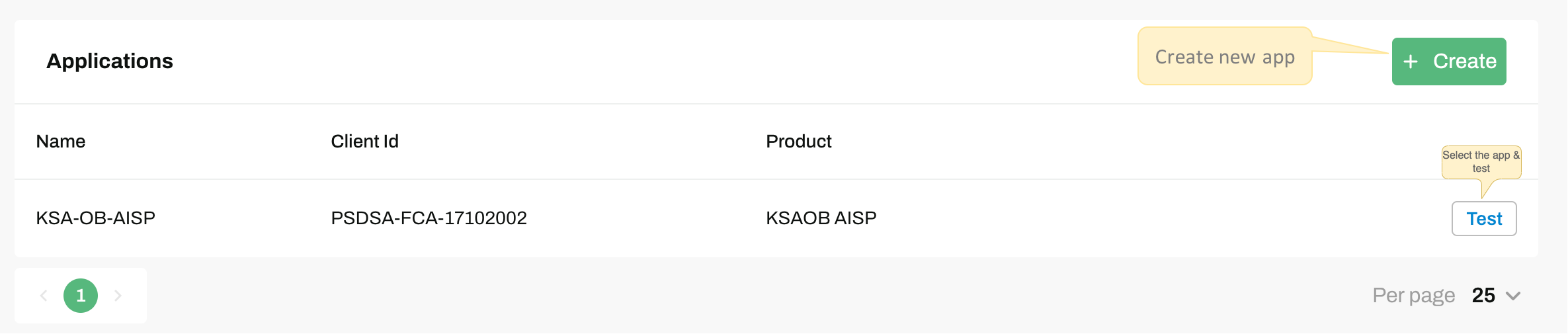
1. Select App
On clicking the
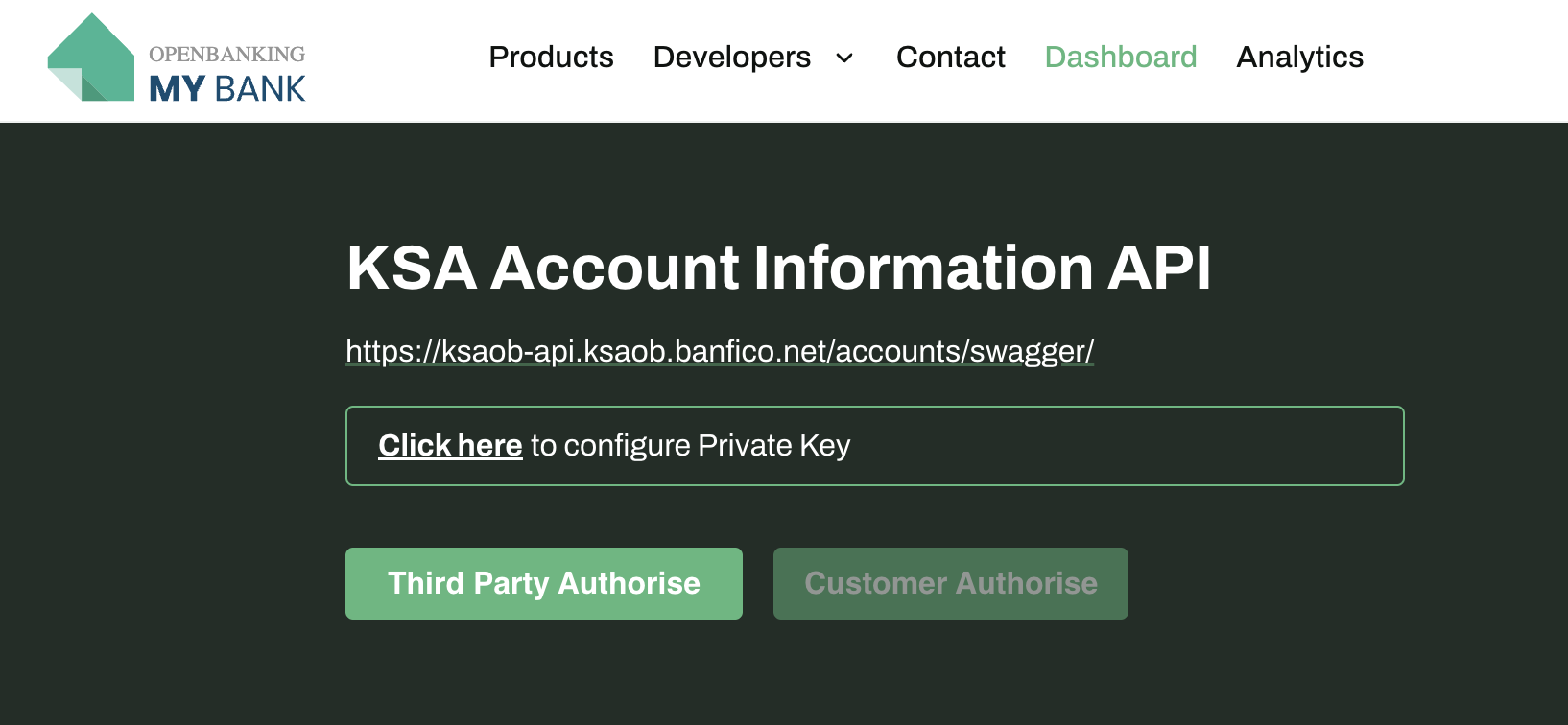
2. Developer Token Generation
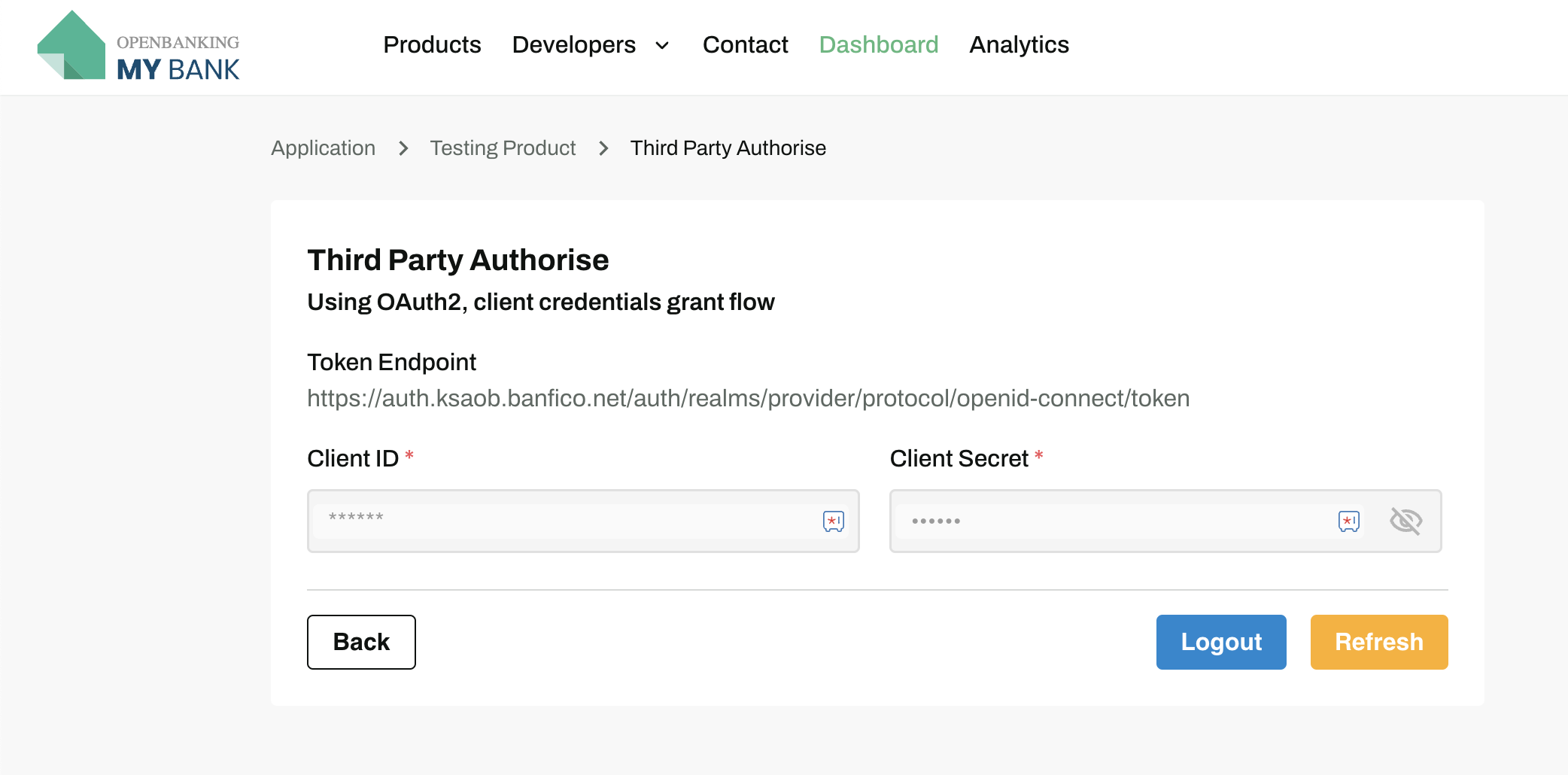
The first step is to configure the Private Key using the
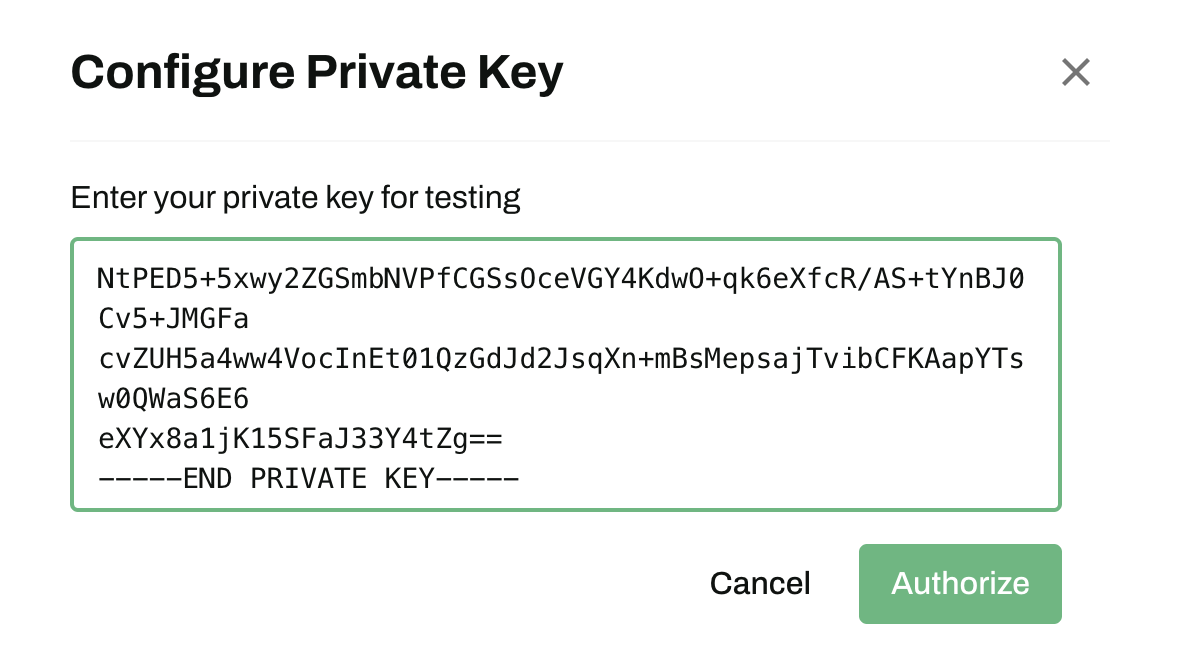
Private-Key for Client Certificate
-----BEGIN PRIVATE KEY-----
MIIEvAIBADANBgkqhkiG9w0BAQEFAASCBKYwggSiAgEAAoIBAQDaGj3mL+E3Mflz
oQ8iXkPFoW76OMA81+E6JxYr+wfWuHFTG5HeAH/6fujz3LNRz4t6ib8I3p11aDhC
ABfKPgoGspG+uoQQfbUTseYcSg9XcgQ4asNTYvSlribDTLH2bi7LZLfTIpIsOA7o
JMIXwQu+zSs/dOWAtr8abiV+aweEFCzoR53lz/Hkz4gukv7/JbyuRiN1tbsRwnTz
sDdpN47G61j6eYHiAAtirGSuA0MXbHolztOPyB6hJFelbg52TY5z1zYWQL1KCoXU
ubq5LpZwXhngmzT+LN+giYTHEDB3AIMibwjcIt8M6BIHtH37inyXZYHhTnXwH4YG
UtnDLtOPAgMBAAECggEAdHKUYAVqWtzs0gbJHNF1n9w8c46/XPzqPPFHjj3eho89
umC69ewQaH9AA4vvlhuY3dkTzTmGmnwFpX+FNC8BjWfkFxBgmKl1d8mBEdOc81Rl
2nVuSmRIOPmNqrKVRfy4MVJaL3mCz+cyVlHh62rfyYSjtaLFMn7f882haSjd/28F
HpfwJvrVcb2zEtbWdOBMH09fBSLqF7SuIGrawldyfdqbwZeqGuFxgDR8+675V65/
cEgIj8m5YcwnfFPptLNB8bcOcAFdQh1IQcJRnHw0DOrD8DvKs22VjnFpC+i7VoWS
GORahAUI7oZRayJhswq+DKHDXAr/bYMxU7oT0brFwQKBgQD/hdmgOyS7pFZPUcTy
GCl/zGYFLyFYHGLqCcHcvIIZBRqTuO6k6uD2f+zpQlcYeGYToBvgLJF66ja3ipee
XO0eTipwRcZuKh2SX6hYmj8f1HGNMi/WeHkfJoQhNVMw0hudxhh8gWwmsRr+LPyj
iXSoufzt3vVN52yFnMbhJ/0V4QKBgQDagoDYtLxm3RM086WIA3YtJ8repK4/XjzM
pDrm5vVpbVmBVqz+ypG6/punSX3gfS58IOaW4hw6FlWdhqkQEeg8bewKs/QXkc4a
c8EMj0ioeaYtJ3XF9sV8gl55bXshHR0yVoh2puDatDNUJyEzM8jtPA8jWVPbJQe7
N3FUNp83bwKBgErv4kcPkVJGe9l/TZcCZwlH1JOoosrIaGniuqwVzMGxsX2pOrO6
/obMNZqjDg/rH2SaDBLOf0vg7HMffh+/ePruSZvrmqosR8fpreFuOx0GnNaf5U+s
vTjZft6OWPt0Ywz+T6gT/LfMMPJiFyWO5lulT/wi6yYRvM3ikKDvrVWBAoGAROxl
N/XKd6fEJy+zRvPQku26UAAh9lsDUol7CtpPDrIvSVzNtJCw5wrojhvgWK8juoOm
OHGZ9biVyNpw+WCsoGML0VRx6f1TxYQ9oHiRspKsmBGaVJdCM8PriOG/tPI6A2bI
JKT+x/2PMzwkfMIY3rvTCpNin/1OMv+J/8Y68oECgYAS8AHgjWdTK321VUuxcJqT
NtPED5+5xwy2ZGSmbNVPfCGSsOceVGY4KdwO+qk6eXfcR/AS+tYnBJ0Cv5+JMGFa
cvZUH5a4ww4VocInEt01QzGdJd2JsqXn+mBsMepsajTvibCFKAapYTsw0QWaS6E6
eXYx8a1jK15SFaJ33Y4tZg==
-----END PRIVATE KEY-----
Private-Key for JWKS url
-----BEGIN RSA PRIVATE KEY-----
MIIEpQIBAAKCAQEA0J5vAPXfZS755gaBYn2PEakdHLtAmZc0cKA5wTL89V4uz9sd
kiub+S91cJUTqfxqFFwFe+acTKW7+HKOusJREq3oWNyv394+2OXSDz15Lso6GEAT
orSRTWzfqUjogjOOBxrvxrcMyxS2RM/NjaNPw2PDWO6u0/BHPWbzyKdKbzzGsuqp
d4bZ85+xzDXhXRe0n23GCnGxpPM0SvsW9CAme23+ET/F6VdfPKkX0GSU/vxdwEwG
Urk5sbBmtoLcj+pfpJKaA7ZbtLsngrIVIPRNUdcP3eCPiYHrDltsi1wnWlnRj2OB
cqfM6bVOQfIiVLv+UC2PgY9gmzzw+Q86GPBQOwIDAQABAoIBAQCsJhDzefEeTeVp
K3UZEQM+T472Zo6oL13WkmEWTDzxPQbj/qwoMlRDDCadAGd5nhDrPARKecIAfcLf
AalF85NzFo7kxTdcRMkXso3khZW6RqYp3LZXTSmZ+n2V89PpnSFWO6QhFmw4KJ8/
qTq15k2rrmdEu7EIsv4WbR4+Nc32e3L9PRcHM14ez3rXPEt9z9BAUwnjqmm4uXmc
GmYwSs2EHC1jfTLWzpxdYCEQNG959jKE4/JIKNuZRZJ6XuzC4bFkpAhiQlLVAn6D
97gPJWDJuxjSZtovbA2dlhb+uRUS2Ygj0vi0Z/NxgFh3vTzg5e9OWHxhW4l+DGoK
shiU5BABAoGBAOw3B2wahVxulE8V+p3yOCiEsoSoQIXuOx90IwUWTdNxBUdPi6ce
p3GOZIjDMf/Hjz85Tv1PCJxuj84QIGRXbaiWLdpXFC+dB53z1r9SqBhXvGwjae4m
Epik/9EoxU8wWZ5qAKBXGxAM1x4IFjJ2zK6UiwRB+uHRdhqoF11VxhHbAoGBAOIX
rwjuYHFQuEDmcaGqXYLwdAMEohxmRLgIIa2JXf+oDZeNsjJjrKgYUeV4Ckp4FL9r
6zPTZBl3FEVWK3LpCyk920uchqeW18zIxKHQ4ozqN9zsc/7lrXFEh+SaQewaVEtl
LqKpySQNGJy4/71u4x3M3d9//zyfQkEmuUkwPvkhAoGBAJRLl+VOYRs+cO2Vptky
D/+gD1MpLhjnD0cX6kRvVDzCX8X9Mnegzw6DjqotoV4rMstGd0igLY/H+ZAsn6lf
GgEVB4Rj1tBtjTKkutUyV0WxDyH0ubRBQruCGvh82CJ3AExr0CjZhqv047h+6zCT
VLzllMD/iznp/nONw91c1BSxAoGAXSY21i4oC+ee0hZfcKTZPA5HLcsl4x97Znrr
LS0wThl16B/X8AzC4MqMS0dmrgHFQox67fJFBnzaHCsBYamEEKzMgd1uWPO720JI
SQbfoAELnPjKXZVRHR6IAnZPfK/oVNvOF/Rty22d20wZCXn7FpcGPoPkq5xN1rvW
kMHQ4CECgYEA5d84bsBKb6u0YspU9hpc9o8F5PcJxqlwsfyOof80tUwA3NTk985c
vaiXM5kQwM21q7bCyMoNfTi681MzlK1gt9GYRAHV4NJhw410mGDdnmGYFtsJwJIZ
bnwttYJsI0RIrk7Irom8HD2AnTvV5aI05Dxhv/+nCfn+bhy1Qqwce98=
-----END RSA PRIVATE KEY---
The next step is AISP's App-Id to get authenticated by clicking the
3. Account Consent Request Call
The bearer token _(access_token)_from above step should be populated in the AISP Consent Endpoint -
The access_token is validated against the necessary checks and TPP is validated
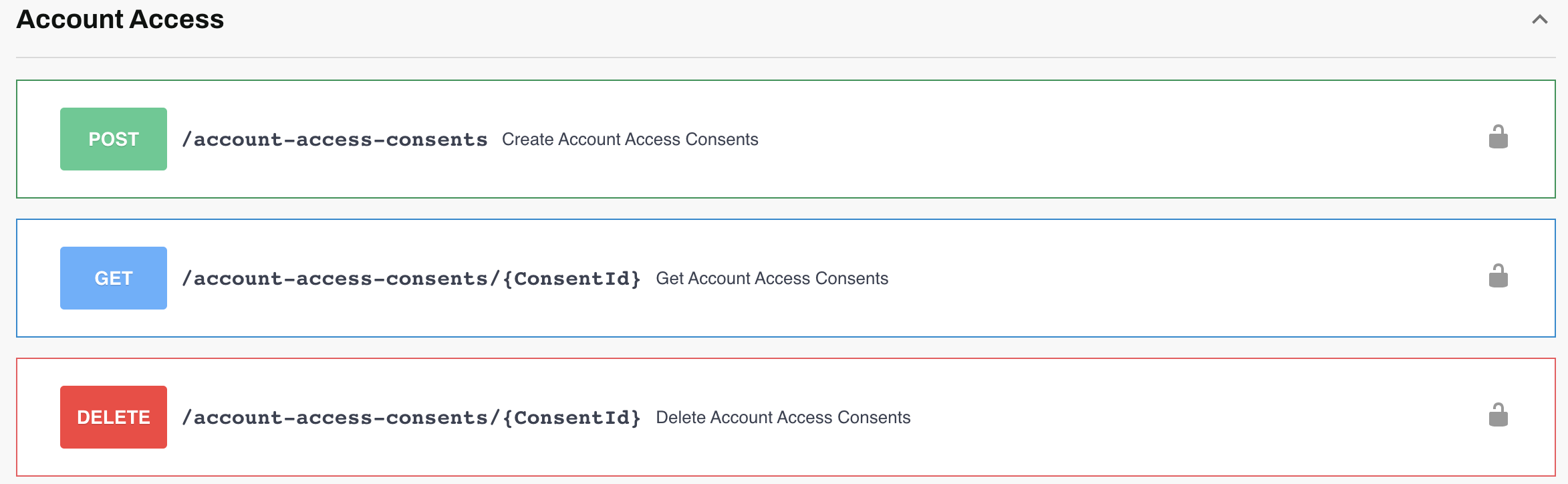
Use the below payload to send an account request.
Note: National Identification Number must be fetched for PSU user from the Core Bank. For details, check here.
{
  "aud": ["Banfico"],
  "nbf": 1701952096,
  "iss": "TPP",
  "exp": 1701952996,
  "iat": 1701952296,
  "message": {
    "Data": {
      "Permissions": [
        "ReadAccountsBasic",
        "ReadAccountsDetail",
        "ReadBalances",
        "ReadParty",
        "ReadPartyPSU",
        "ReadPartyPSUIdentity",
        "ReadBeneficiariesBasic",
        "ReadBeneficiariesDetail",
        "ReadTransactionsBasic",
        "ReadTransactionsDetail",
        "ReadTransactionsCredits",
        "ReadTransactionsDebits",
        "ReadScheduledPaymentsBasic",
        "ReadScheduledPaymentsDetail",
        "ReadDirectDebits",
        "ReadStandingOrdersBasic",
        "ReadStandingOrdersDetail"
      ],
      "AuthorizationExpirationTimeWindow": "720:00:00",
      "ExpirationDateTime": "2026-07-30T15:27:13.019Z",
      "NationalIdentificationNumber": "1111111111 -------Unique ID to be fetched from Core Bank-------",
      "TransactionFromDateTime": "2026-06-01T12:19:24.019Z",
      "TransactionToDateTime": "2026-07-30T12:19:24.019Z",
      "AccountType": [
        "KSAOB.Retail"
      ],
      "AccountSubType": [
        "CurrentAccount"
      ],
      "FourthParty": {
        "TradingName": "Rand's Company",
        "LegalName": "Rand's Ltd",
        "IdentifierType": "KSAOB.UnifiedCommercialNumber",
        "Identifier": "123456"
      },
      "SponsoredTPP": {
        "TradingName": "Khalid Company",
        "Identification": "123456"
      },
      "ConsentPurpose": [
        "Account Aggregation",
        "E-Statement"
      ],
      "IsPSUReadAllAccounts": false
    },
    "Risk": {
      "PSUIndicators": {
        "PSUName": {
          "en": "Mohammed",
          "ar": "محمد"
        },
        "PSUPhoneNumber": "0555555555",
        "IsCustomerRegistered": true,
        "IsCustomerVerified": true,
        "FailedLoginAttempts": 2,
        "PasswordChangedDateTime": "2026-01-27T15:27:13.019Z",
        "PSUOnboardingDateTime": "2026-01-27T15:27:13.019Z"
      },
      "DeviceIndicators": {
        "GeoLocation": {
          "latitude": "40.730610",
          "longitude": "-73.935242"
        },
        "DeviceId": "5423412345678909",
        "VPNStatus": false,
        "RemoteAccessTool": false,
        "Screensharing": false,
        "DeviceSoftwareRestricted": true,
        "TrustedDeviceFlag": true,
        "TrustedDeviceDateAndtime": "2026-01-27T15:27:13.019Z",
        "MechanismOfTrustingDevice": "KSAOB.IVR",
        "IPAddressVersion": "KSAOB.IPv4",
        "DeviceType": "KSAOB.Smartphone",
        "DeviceName": "My phone",
        "ConnectionType": "KSAOB.WiFi",
        "AppVersion": "1.4",
        "LocaleInformation": "SA",
        "StorageCapacity": "128GB total, 30GB free",
        "ScreenReaderActive": false,
        "ISPName": "STC",
        "NetworkType": "KSAOB.5G"
      },
      "RequestIndicators": {
        "InitiationMode": "KSAOB.UserInitiated",
        "AcceptanceChannel": "KSAOB.Mobile"
      }
    },
    "Subscription": {
      "Webhook": {
        "Url": "https://api.tpp.com/webhook/callbackUrl",
        "IsActive": false
      }
    }
  }
}- On a successful request the Developer will receive the below response.
- Please verify that a unique 'ConsentID' will be generated and the status of the 'ConsentID' will be set as AwaitingAuthorization.
{
  "aud": "TPP",
  "nbf": 1779434360,
  "iss": "Banfico",
  "exp": 1779434361,
  "message": {
    "Meta": {
      "TotalPages": 1,
      "MultipleAuthorizers": null
    },
    "Risk": {
      "PSUIndicators": {
        "PSUName": {
          "en": "Mohammed",
          "ar": "محمد"
        },
        "PSUPhoneNumber": "0555555555",
        "IsCustomerRegistered": true,
        "IsCustomerVerified": true,
        "FailedLoginAttempts": 2,
        "PasswordChangedDateTime": 1674822433,
        "PSUOnboardingDateTime": 1674822433
      },
      "DeviceIndicators": {
        "GeoLocation": {
          "Latitude": "40.730610",
          "Longitude": "-73.935242"
        },
        "DeviceId": "54234",
        "VPNStatus": false,
        "RemoteAccessTool": false,
        "Screensharing": false,
        "DeviceSoftwareRestricted": true,
        "TrustedDeviceFlag": true,
        "TrustedDeviceDateAndTime": 1674822433,
        "MechanismOfTrustingDevice": "KSAOB.IVR",
        "IPAddressVersion": "KSAOB.IPv4",
        "DeviceType": "KSAOB.Smartphone",
        "DeviceName": "My phone",
        "ConnectionType": "KSAOB.WiFi",
        "AppVersion": "1.4",
        "LocaleInformation": "SA",
        "StorageCapacity": "128GB total, 30GB free",
        "ScreenReaderActive": false,
        "ISPName": "STC",
        "NetworkType": "KSAOB.5G"
      },
      "RequestIndicators": {
        "InitiationMode": "KSAOB.UserInitiated",
        "AcceptanceChannel": "KSAOB.Mobile"
      }
    },
    "Links": {
      "Self": "/v3.10/account-access-consents/acc-9149217c-beed-41ff-8ff8-ccd66f3d3fc0"
    },
    "Data": {
      "authorizationExpirationTimeWindow": "720:00:00",
      "ConsentId": "------Consent_Id------",
      "CreationDateTime": 1779434359.302,
      "Flag": {
        "partlyAuthorized": 1779434359.302
      },
      "Permissions": [
        "ReadAccountsBasic",
        "ReadAccountsDetail",
        "ReadBalances",
        "ReadParty",
        "ReadPartyPSU",
        "ReadPartyPSUIdentity",
        "ReadBeneficiariesBasic",
        "ReadBeneficiariesDetail",
        "ReadTransactionsBasic",
        "ReadTransactionsDetail",
        "ReadTransactionsCredits",
        "ReadTransactionsDebits",
        "ReadScheduledPaymentsBasic",
        "ReadScheduledPaymentsDetail",
        "ReadDirectDebits",
        "ReadStandingOrdersBasic",
        "ReadStandingOrdersDetail"
      ],
      "ExpirationDateTime": 1785241633,
      "TransactionFromDateTime": 1674638364,
      "TransactionToDateTime": 1674811164,
      "AccountType": [
        "KSAOB.Retail"
      ],
      "AccountSubType": [
        "CurrentAccount"
      ],
      "NationalIdentificationNumber": "1111111111 -------Unique ID to be fetched from Core Bank-------",
      "FourthParty": {
        "TradingName": "Rand's Company",
        "LegalName": "Rand's Ltd",
        "IdentifierType": "KSAOB.UnifiedCommercialNumber",
        "Identifier": "123456"
      },
      "SponsoredTPP": {
        "TradingName": "Khalid Company",
        "Identification": "123456"
      },
      "Purpose": [
        "Account Aggregation",
        "E-Statement"
      ],
      "IsPSUReadAllAccounts": false,
      "ConsentStatus": "AwaitingAuthorization",
      "ConsentStatusUpdateDateTime": 1779434359.302
    },
    "Subscription": {
      "Webhook": {
        "Url": "https://api.tpp.com/webhook/callbackUrl",
        "IsActive": false
      }
    }
  },
  "iat": 1779434359
}
The response provides the ConsentId, Consent Status & scaOAuth endpoint. The Developer uses this well known endpoint URI of the bank to redirect user to the bank for authentication.
4. PSU Authentication
Select the
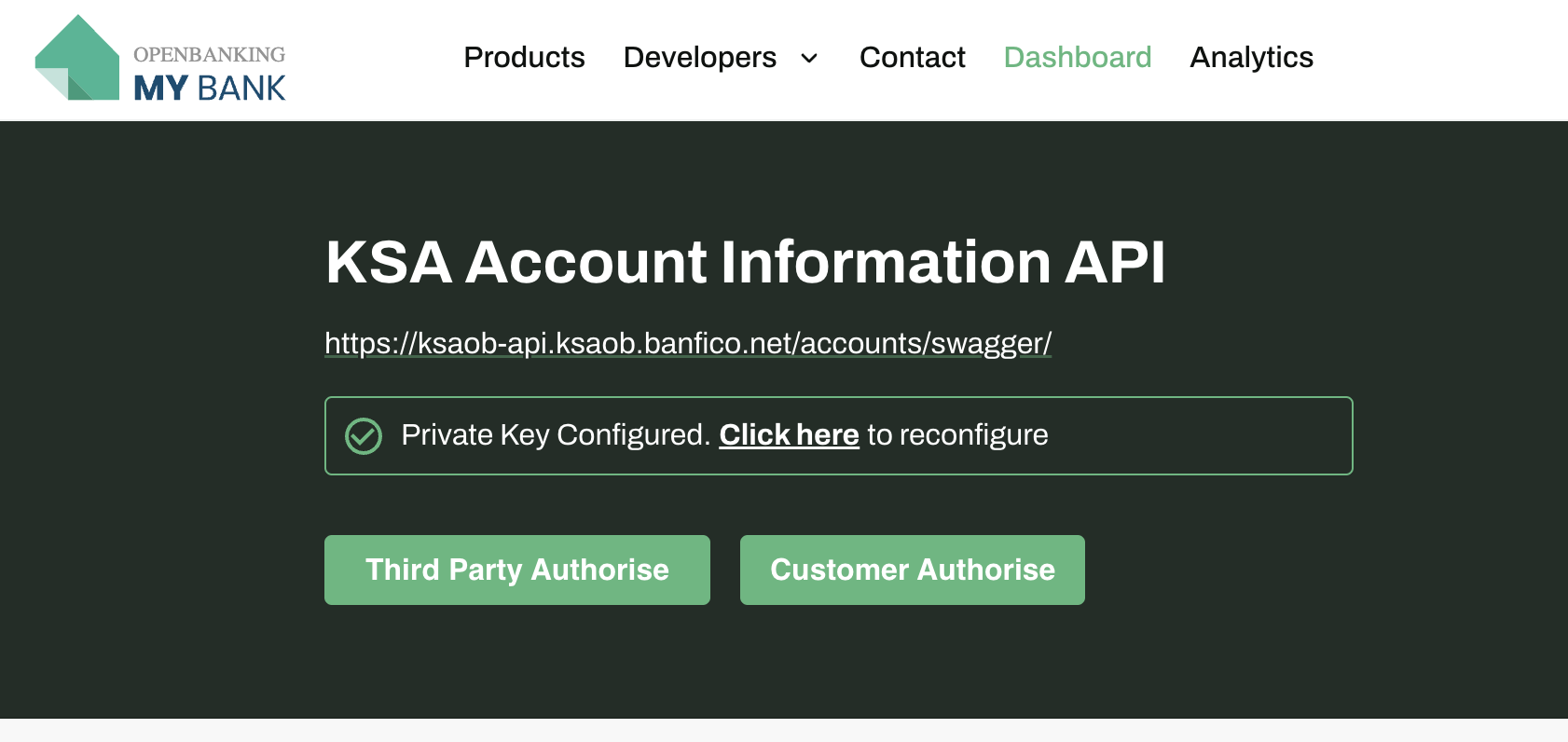
Two types of PSU Authentication flows are supported:
- Redirect Authorize
- Decoupled Authorize
To navigate through PSU authentication flow and generate PSU Token please refer PSU Authentication flow
5. Account Information API call
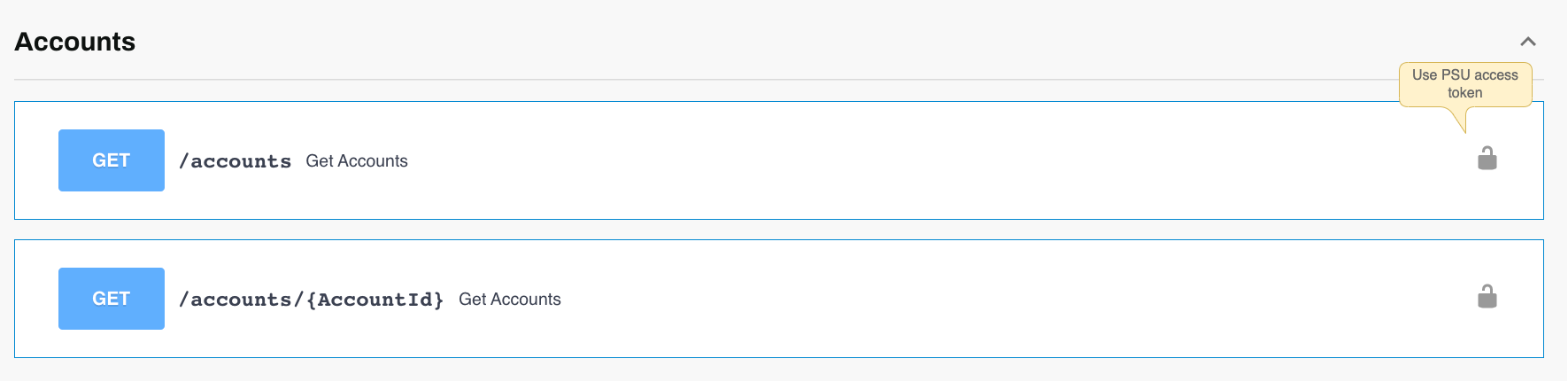
The account authorization header is auto-populated. A sample response will be like this:
{
  "aud": "TPP",
  "nbf": 1779710492,
  "iss": "Banfico",
  "exp": 1779710493,
  "message": {
    "Meta": {
      "TotalPages": 1
    },
    "Links": {
      "Self": "/open-banking/account-information/2024.09.01-final-errata1/accounts"
    },
    "Data": {
      "Account": [
        {
          "AccountId": "6a06cf368527080018a71048",
          "Status": "NotActive",
          "StatusUpdateDateTime": "2019-01-01T06:06:06+00:00",
          "Currency": "SAR",
          "AccountType": "KSAOB.Corporate",
          "AccountSubType": "CurrentAccount",
          "Description": "Account Details",
          "Nickname": "Bills",
          "OpeningDate": "2002-01-05T00:00:00+00:00",
          "MaturityDate": "2026-05-25T12:01:31+00:00",
          "AccountIdentifiers": [
            {
              "Identification": "SA5693754356561103517896",
              "Name": "TESTUSER+PSU",
              "IdentificationType": "KSAOB.IBAN"
            }
          ],
          "Servicer": {
            "Identification": "SASAMA",
            "IdentificationType": "KSAOB.BICFI"
          }
        }
      ]
    }
  },
  "iat": 1779710491
}